Stay Ready with WBD Alerts

WBD Alerts is the company’s emergency notification system. In the event of an emergency or disruption impacting your work location, WBD Alerts can provide critical information, updates, and resources to help you stay safe and informed. However, we can only reach you if we have your up-to-date contact information. (And don’t worry, WBD Alerts will only be used to contact you in times of major disruption, when it’s really important.)
Please take a moment to review the information below, get to know WBD Alerts, and share your contact details to stay ready and informed!
Take one minute to get yourself ready:
- SHARE YOUR CONTACT DETAILS
-
Please share as many contact points, such as personal email and mobile phone, as you can to make sure we can reach you during times of crisis. Be assured that all personal information is kept strictly confidential and will only be used to contact you in an emergency.
Ready to share? Take the following steps.
- Visit https://wbd.alertmedia.com/and sign in via SSO using your company email and password.
- Click "My Account" from the toolbar on the left side of the screen.
- Complete the following fields:
- Work/Zoom Phone
- Work Mobile
- Personal Email
- Personal Mobile
4. Click to "Save" to ensure your new details are in the system.
If you do not have a company provided email account or if you are having trouble accessing the Self-Service Portal, please use this form.
We have your information in our system. We do recommend that you do a double-check, even if you’ve previously entered your contact info.
Once you receive a WBD Alert via text message, it's a good idea to save the phone number as a contact. This helps to ensure that the message won't be filtered out.
- RECEIVE ALERTS FOR MULTIPLE LOCATIONS
-
Those who manage or support team members in different regions or work out of multiple offices may want to consider opting in for WBD Alerts in other areas, not just their primary location.
To opt in to WBD Alerts for additional locations, click here to login with SSO, go to "My Account" and then select the "Preferences" tab to sign up to receive WBD Alerts for other WBD office locations ("Public Group Subscriptions").
There is no limit to the number of Public Groups you can subscribe to.
- INSTALL THE WBD ALERTS APP
-
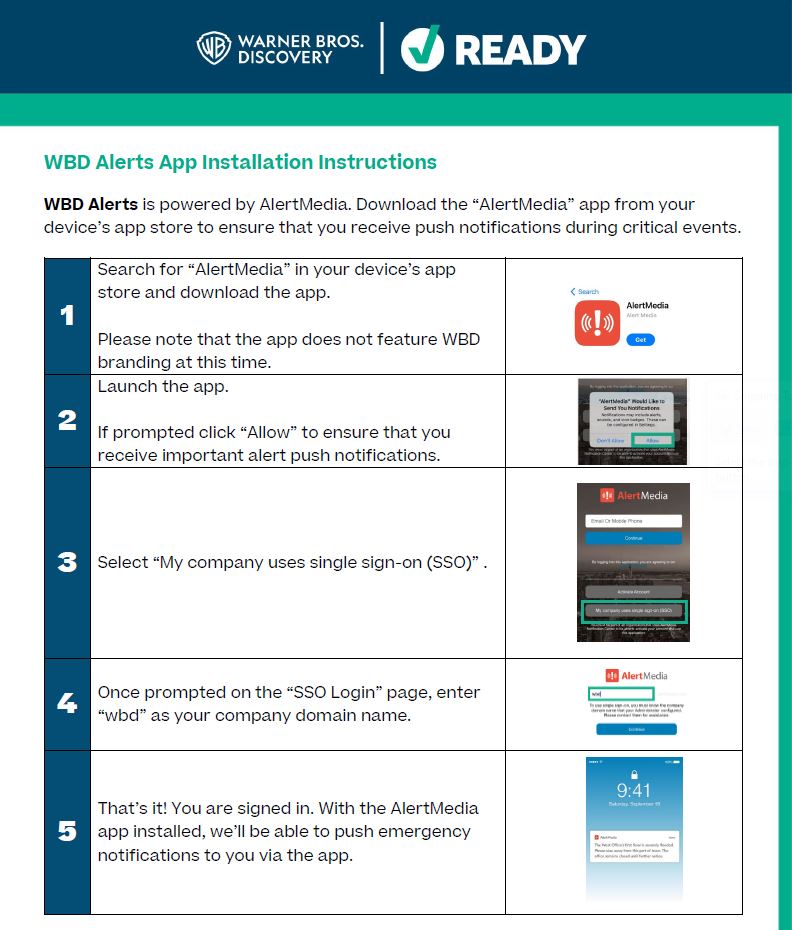
WBD Alerts is powered by the AlertMedia app. Get started by downloading AlertMedia from your preferred app store:
See below for instructions on how to install the WBD Alerts app, or download our tips here.
Important Items to Note:
- If prompted, click “Allow” to ensure that you receive important push notifications
- On the SSO log in page, enter “WBD” as your company domain name
- PRODUCTIONS
-
Production Employees: Sign up for WBD Alerts by production location or type.
- WBD ALERTS FAQ
-
Do I have a WBD Alerts account?
If you are an employee or a consultant with a company email your account is automatically created in the WBD Alerts system with your work email. However, your work email won’t help us reach you in the event of an emergency in which our email system or area networks are unavailable.
Please update your profile with as much contact information as you are comfortable sharing. During an emergency, we can contact you via text, email and mobile if you provide those contact details. Without these additional contact details, you could be missing pertinent information. The WBD Alerts app provides another way for us to contact you, which is not reliant on cellular service.
Why should I sign up for WBD Alerts?
When we can reach you, we can work to help you. When an emergency strikes, receiving WBD Alerts on multiple platforms can help the company keep you informed with potentially life-saving information and account for you in times of disaster.
The more personal contact points you provide, the better chance you have to receive a message in a crisis or emergency. Be assured that all personal information is kept strictly confidential and will only be used to contact you in an emergency.When will WBD Alerts be used to contact me?
The WBD Alerts system is used in the event of an emergency to help employees, contractors and partners make informed decisions and keep them safe. The WBD Alerts system can warn of imminent threats to health and safety as well as provide awareness notifications related to your work locations or environments.
You may receive alerts for the vicinity in or around your primary work location as well as the company's business operations worldwide, as appropriate.
How will WBD Alerts contact me?
Alerts can be received via text, email, phone or mobile app. You can indicate your contact preferences by choosing what information to provide. Remember, the more contact info you provide, the more opportunities we have to reach you quickly during a crisis. (Please note: Message and data rates may apply.)
You may also download the AlertMedia App, which will share important, timely information in the event of an emergency or business disruption.
Will WBD Alerts contact me about anything other than emergency situations?
We will send WBD Alerts only in the event of an emergency (e.g., natural disasters, fires, pandemic, mass system outage). You may receive multiple messages pertaining to the emergency to ensure you have the most up to date information available. On occasion, the Alerts system may be tested during an emergency preparedness exercise; you should receive notification of a test before it’s sent.
Can I opt out of WBD Alerts at any time?
Receiving alerts on company-provided devices and through your company email is company policy. However, if you would like to opt out of receiving alerts on your personal device, you can do so by visiting wbd.alertmedia.com using SSO, selecting “My Account”, clicking the “Preferences” tab, and un-ticking the “Personal Mobile” tick boxes under “Contact Preferences”.
If you choose not to provide your personal device information, we recommend downloading the WBD Alerts app, powered by AlertMedia, on your personal device to allow you to access updates and notifications.
How do personal contact details provided for WBD Alerts differ from information I may have provided to People & Culture?
WBD Alerts is used to notify large groups during an emergency or safety threat (e.g., building closure). Emergency contacts within People & Culture/HR systems might be used to contact people you designate (spouse, partner, family member, etc.) during a personal event (e.g., medical emergency).
Does WBD Alerts comply with privacy laws?
The WBD Alerts system and WBD Alerts app, powered by AlertMedia, comply with all applicable privacy laws in regions where it is available. Be assured that all personal information is kept strictly confidential and will only be used to contact you in an emergency.
Does WBD Alerts replace Crisis24 or government alerts systems?
No, WBD Alerts is specific to emergencies related to the WBD employee and contractor workforce, and our workplaces. International SOS and government alert systems can be used in parallel.
I work remote, can I still sign up for WBD Alerts?
Yes, we want to reach you no matter where you live and work. Click here to login with SSO, go to "My Account" and then select the "Preferences" tab to sign up to receive WBD Alerts for other WBD office locations ("Public Group Subscriptions").
I work out of multiple offices; can I sign up to receive alerts for more than one location?
Yes, we understand that many WBD employees travel to offices around the world. Click here to login with SSO, go to "My Account" and then select the "Preferences" tab to sign up to receive WBD Alerts for other WBD office locations ("Public Group Subscriptions").
I work on a production; can I still sign up for WBD Alerts?
Yes! We strongly encourage you to sign up for WBD Alerts so that you can receive critical information in the event of an emergency or disruption impacting your production. Click the links for Burbank or Leavesden above to provide your contact details.
More questions? Please email WBDReady@wbd.com.